
Instagram · How to
How to Download Instagram Carousel Posts (All Slides) in 2027
Open a carousel, click Download all, and get every slide at full quality in one zip. Plus what to use for your own posts, and what to avoid.
 Antony JacksonNov 11, 2026 · 6 min read
The short answer
Instagram has no button to download a carousel. The quickest way on a computer is a Chrome extension that reads the post you have open. With Feedlyy, you open the carousel and click Download all. Every slide, photos and videos, arrives at full quality in one zip, numbered in the order the creator posted them.
It works the same for Reels and videos, right on Instagram. It is free, there is no watermark, and you never leave Instagram, paste a link into another website or hand over your Instagram password.
Download every slide with Feedlyy
- Add Feedlyy to Chrome. It is free and takes a few seconds from the install page.
- Open the carousel on instagram.com. Click the post so it opens on its own, at an address like instagram.com/p/….
- Click Download all. A green button appears beside the post. On a carousel it shows how many slides it holds, for example Download all 3. On a single photo or Reel it reads Download or Download video.

A 7-slide carousel from NowBrief: one click on Download all 7 saves every photo and video as a zip. 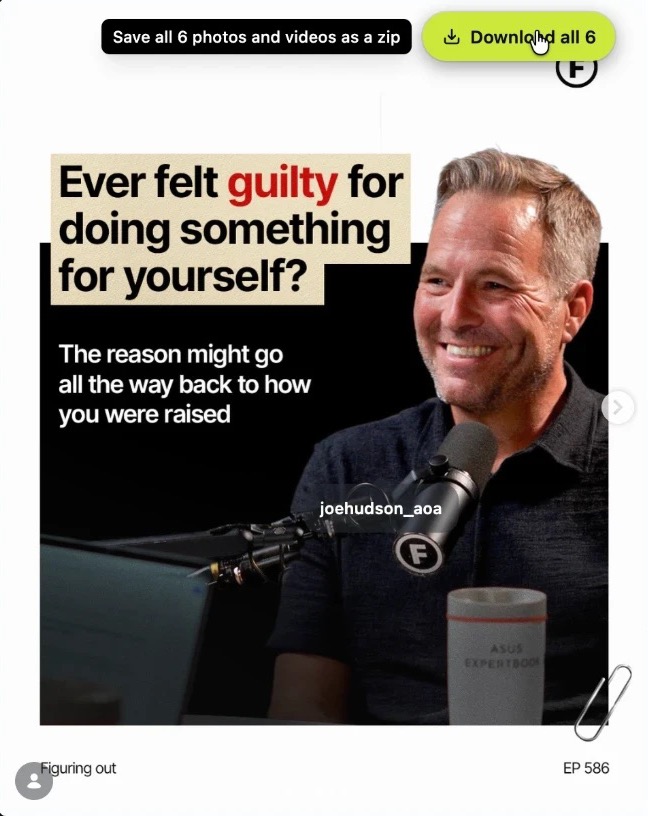
Carousel
Download all 6
One .zip, every slide
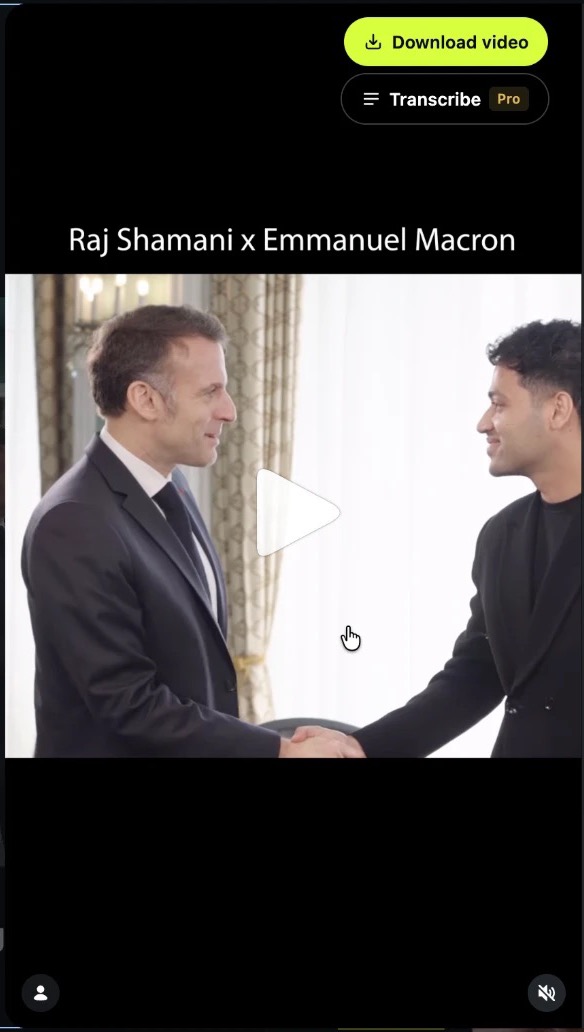
Reel or video
Download video
One .mp4 with sound
One button for every post. Examples from @figuringout.co. - Open the zip. Your browser saves one file named after the post. Inside, the slides are numbered 01, 02, 03 in order, so they are ready to drop into a deck, a moodboard or your notes.
You don't need to swipe through the slides first. Feedlyy reads the whole post at once, so slides you haven't looked at are included too.
Save time: no other website
The usual way to save an Instagram post goes like this: copy the link, open a downloader website, paste it, close two pop-up ads, wait, then download each slide one by one. Then do it again for the next post.
With a downloader website
- 1Copy the post link
- 2Open a downloader website
- 3Paste the link and wait
- 4Close the pop-up ads
- 5Save each slide one by one
- 6Go back to Instagram
6 steps, for every post
With Feedlyy
Every slide in one zip, full quality.
You never leave Instagram.
1 click
With Feedlyy the download button sits on the post itself. You stay on Instagram, click once, and keep scrolling while the file saves:
- No copying links. The button already knows which post you are on.
- No switching tabs. Nothing to open, nothing to paste, no ads.
- No slide by slide. A 10-slide carousel is one click, not ten.
- Any post. Carousels, single photos, Reels and videos, all from the same button.
If you save references for content ideas every week, those minutes add up fast, and none of them are spent on sketchy websites.
Other ways, and where they fall short
| Method | What you get | Quality | Effort |
|---|---|---|---|
| Feedlyy for Chrome | Every slide, photos and videos | Full quality | One click, one zip |
| Screenshots | One slide at a time, photos only | Cropped and compressed | Slow |
| Download your information | Only your own posts | Full quality | Takes hours or days |
| Downloader websites | Varies | Often compressed | Paste links, ads and pop-ups |
Screenshots work in a pinch, but you crop every slide by hand, lose resolution, and can't capture a video at all.
Download your information is Instagram's own tool in Accounts Center. It is the right choice to back up everything you have posted, but it only covers your own account and the file can take a while to arrive.
Downloader websites ask you to copy and paste each link, often show heavy ads, and some miss slides or compress them. Never give one your Instagram login. Feedlyy never asks for your password; it works on the page you already have open.
Download every carousel from a profile
If you are studying a creator or a competitor, one post at a time is slow. Run Feedlyy research on their profile and it sorts every post by Breakout score, so the carousels that beat that creator's usual numbers rise to the top. Then download the whole set as one zip, or export it to CSV, Excel or JSON. See save and export.
That is how a swipe file gets built in minutes: the carousels that worked, saved together, with their numbers beside them. For the full routine, read how a marketer researches a competitor. If the winners are Reels instead, you can transcribe a Reel to text and study the hook.
Use what you download fairly
A downloaded post still belongs to the person who made it. Saving carousels to study, plan or keep a reference is fine. Reposting someone else's slides as your own isn't: it breaks Instagram's Terms of Use, and Instagram keeps accounts that mostly repost others out of recommendations (more in how the Instagram algorithm works in 2027). Ask permission and credit the creator if you want to share their work.
Frequently asked questions
How do I download all the photos in an Instagram carousel at once?
On a computer, install Feedlyy for Chrome, open the carousel post on instagram.com and click Download all. Every photo and video in the post is saved at full quality in one zip file, with the slides numbered in order. It is free.
Can I download an Instagram carousel in full quality?
Yes. Feedlyy saves the original files Instagram serves for each slide, not a screenshot, so photos keep their full resolution and videos keep their sound.
Does it download the videos inside a carousel too?
Yes. A carousel can mix photos and videos. Feedlyy saves each one in its own format inside the zip: photos as images, videos as MP4.
Does the account owner know I downloaded their carousel?
No. Instagram does not notify anyone when a post is viewed or saved by a browser extension. Feedlyy only reads the page you already have open and never likes, follows, comments or posts.
Is downloading Instagram carousels free?
Yes. Downloading a single post or carousel with Feedlyy is free on every plan, with no watermark. Pro adds bigger research sets, Niche finder and Transcribe.
How do I download carousels from my own Instagram account?
Instagram's Download your information tool, in Accounts Center, sends a copy of everything you posted. It takes a while to arrive. For a single post you made, Feedlyy is faster.
The bottom line
To save a whole Instagram carousel, every slide at full quality, the fastest way is one click in Chrome. Add Feedlyy to Chrome for free, open any carousel and click Download all.
Try it on a real profile
Sort any Instagram profile by Breakout score in seconds. Free in Chrome.