Instagram · How to
How to Find Viral Reels in Any Niche in 2027
Viral means beating the creator's usual, not the biggest number. Find breakout Reels in 4 steps, map the niche, and learn why they worked.
 Antony JacksonNov 12, 2026 · 8 min read
The short answer
A viral Reel is not the one with the most views. It is the one that got far more views than its creator usually gets. To find them, pick 5 to 10 creators in your niche, open each profile's Reels tab, and look for the Reels that beat that creator's normal by 2 times or more.
Doing that by eye is slow. With Feedlyy for Chrome, one click ranks every Reel on a profile by Breakout score, so the real winners rise to the top. It is free to start, and it works on the Instagram page you already have open.
Where to look for Reels in your niche
Start by collecting creators. These places show you who is active in your niche:
- Instagram search. Type a topic like home workouts or personal finance India and open the Reels results. Note the creators who keep showing up.
- Reels audio pages. Tap the audio name on a Reel to see other Reels using it. Creators in your niche using the same sound are worth a look.
- Explore. Instagram learns from what you watch. Spend a few minutes watching only your niche and Explore fills with it.
- Suggested accounts. Instagram suggests similar accounts on a creator's profile. One good creator usually leads to five more.
These places show you what is popular. They don't show which Reels beat their creator's usual. For that, go to each creator's profile.
Find the breakout Reels in 4 steps
- Add Feedlyy to Chrome. It is free from the Chrome Web Store. No new account is needed for Instagram research.
- Open a creator's Reels tab. Go to their profile on instagram.com and click Reels. On the Reels tab, Breakout score uses views. On the main grid it uses likes.
- Click the Feedlyy icon and start research. The grid comes back ranked by Breakout score. Reels at 2× or more get lightning bolts, and three bolts mark the top of what is on screen.
- Hover a Reel to check the numbers. You see the multiple next to its views, likes and comments, and how it compares with the creator's median.
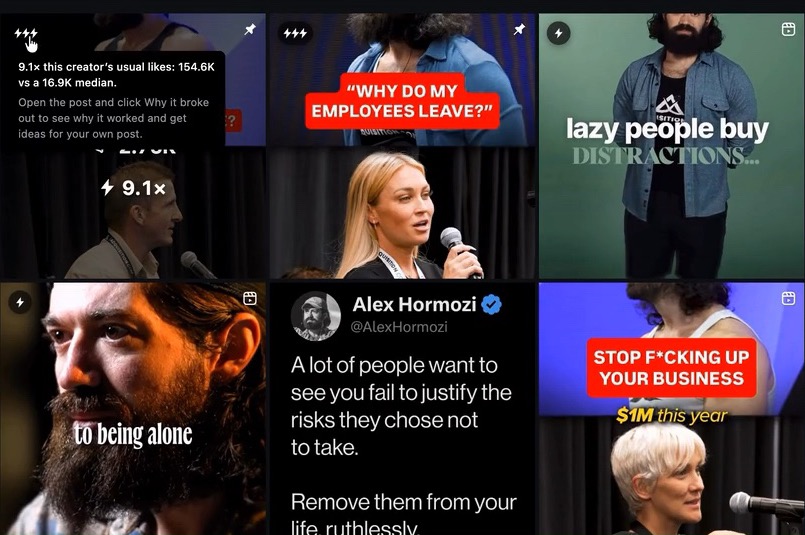
Free covers the latest 25 posts from the last 7 days, 5 runs a month, which is enough to see what is working this week. Pro looks back up to a year and up to 1,000 posts, so you can find every breakout a creator has had.
Find more creators in the same niche
One creator's breakout could be luck. When the same format breaks out for several creators in a niche, it is a pattern you can use. So you want more creators, fast.
On Pro, click Niche on the results header after you research a profile. Niche finder lists up to 50 similar accounts. Filter them by Peers (about the same size), Bigger, or Verified, and by follower count. Click any account to open it in a new tab and research it next.
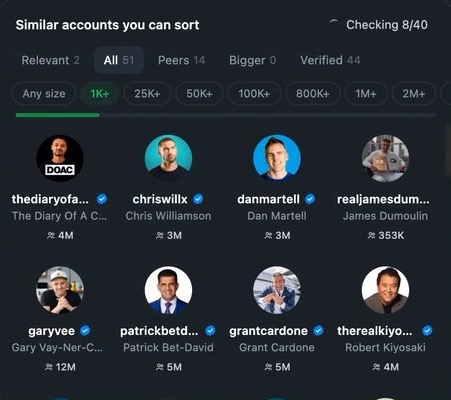
Tip: study creators about your size, not only the giants. A Peer with 20K followers who breaks out is doing something you can copy the shape of this week.
Learn why a Reel went viral
Open a breakout Reel and click Why it broke out. Feedlyy compares it with the creator's other posts and tells you what set it apart, with numbers, for example comments running far above usual or a hook style the creator rarely uses.
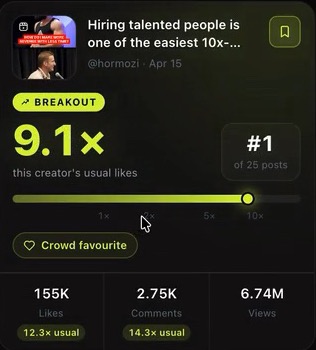
You also get:
- The hook. The first line, labelled by type: a number, a question, a bold claim, a list, a how-to or a story.
- What works for this creator. What their top posts share, such as format or hook type.
- Make it yours. Three fill-in-the-blank hooks to start your own version.
For the script, Pro can transcribe the Reel into timestamped text, so you can study the first three seconds without replaying it ten times.
Turn it into your own Reel
Keep the parts that travel: the format (talking head, list, before and after), the hook type, the length and the ending. Change the parts that belong to the creator: the words, the footage, the voice and the story. Save the best Reels to a collection so your ideas are in one place when you plan the week.
For a step by step on choosing one format and making it yours, read how to pick your next Reel from a Breakout score grid. And for how Instagram decides who sees it, see how the Instagram algorithm works in 2027.
Mistakes that waste your research
- Only studying huge accounts. Their reach comes from their size. Mix in Peers so the lessons fit your account.
- Judging a Reel that just went up. New Reels are still collecting views. Feedlyy leaves posts from the last three days out of the baseline for this reason.
- Using the main grid for Reels. The main grid scores on likes. Open the Reels tab when you care about views.
- One creator, one conclusion. Check that a format breaks out for at least three creators before you build a week around it.
Frequently asked questions
How do I find viral Reels in my niche?
Find 5 to 10 creators in your niche, open each profile's Reels tab, and look for the Reels that got far more views than that creator usually gets. Feedlyy does this for you in Chrome: it ranks every Reel by Breakout score, which is its views divided by the creator's median.
What counts as a viral Reel?
There is no fixed number. A Reel with 50,000 views is normal for a big creator and huge for one who usually gets 2,000. The useful definition is a Reel that beat its own creator's usual views by 2 times or more.
Can I find viral Reels without an Instagram account?
Instagram shows very little to logged-out visitors, so you need to be signed in. Feedlyy reads only the pages you can already see and never asks for your Instagram password.
Is Feedlyy free for finding viral Reels?
Yes. Free gives you 5 research runs a month, each covering the latest 25 posts from the last 7 days on any public profile, with Breakout score and Why it broke out. Pro has unlimited runs, looks back up to a year and up to 1,000 posts, and adds Niche finder and Transcribe.
Should I copy a viral Reel?
No. Copying someone's video, caption or voice can break Instagram's rules and won't build your own audience. Keep the format, the hook style and the length, and make it with your own idea, words and footage.
How often should I look for viral Reels?
Once a week is enough for most creators. Formats come and go, so a short weekly check of the same 5 to 10 accounts shows what is working now.
The bottom line
The Reels to learn from are the ones that beat their own creator's usual, not the biggest numbers on Instagram. Add Feedlyy to Chrome for free, open a creator's Reels tab, and let Breakout score show you what is really working in your niche.
Try it on a real profile
Sort any Instagram profile by Breakout score in seconds. Free in Chrome.